Field Service Dispatching: Definition, Best Practices & When It’s Time to Automate

Field service dispatching is the process of assigning the right technician to the right job at the right time. Done well, it helps businesses respond faster, improve technician productivity, reduce travel time, and deliver a better customer experience. In this guide, we'll explain how field service dispatching works, why it's important, and the best practices that help service teams operate more efficiently.
Field service dispatching explanations + definitions
What is field service dispatching?
Field service dispatching is the process of assigning technicians to service jobs based on factors such as their skills, availability, location, workload, and the urgency of the request. Its goal is to ensure every work order is completed by the most suitable technician while minimizing travel time, reducing delays, and maximizing productivity.
Dispatching is one stage of the broader field service management workflow, bridging the gap between planning work and carrying it out. Once a customer submits a service request and a work order is created, a dispatcher – or dispatching software – determines who should complete the job and when.
Unlike simply assigning work to the next available technician, effective field service dispatching considers multiple variables to make the best possible decision. For example, a technician with the required certification who is already working nearby may be a better choice than someone with a lighter schedule but less relevant experience.
Example field service dispatching workflow
A typical field service dispatching workflow looks like this:
- A customer submits a service request. This could be through a phone call, email, customer portal, or online booking form.
- A work order is created. The dispatcher – or dispatching software – records the job details, including the issue, location, priority, and any required skills or equipment.
- The job is prioritized. Work orders are assessed based on urgency, service level agreements (SLAs), customer requirements, and business priorities.
- The most suitable technician is identified. The dispatcher – or dispatching software – selects a technician based on factors such as availability, location, certifications, workload, and travel time.
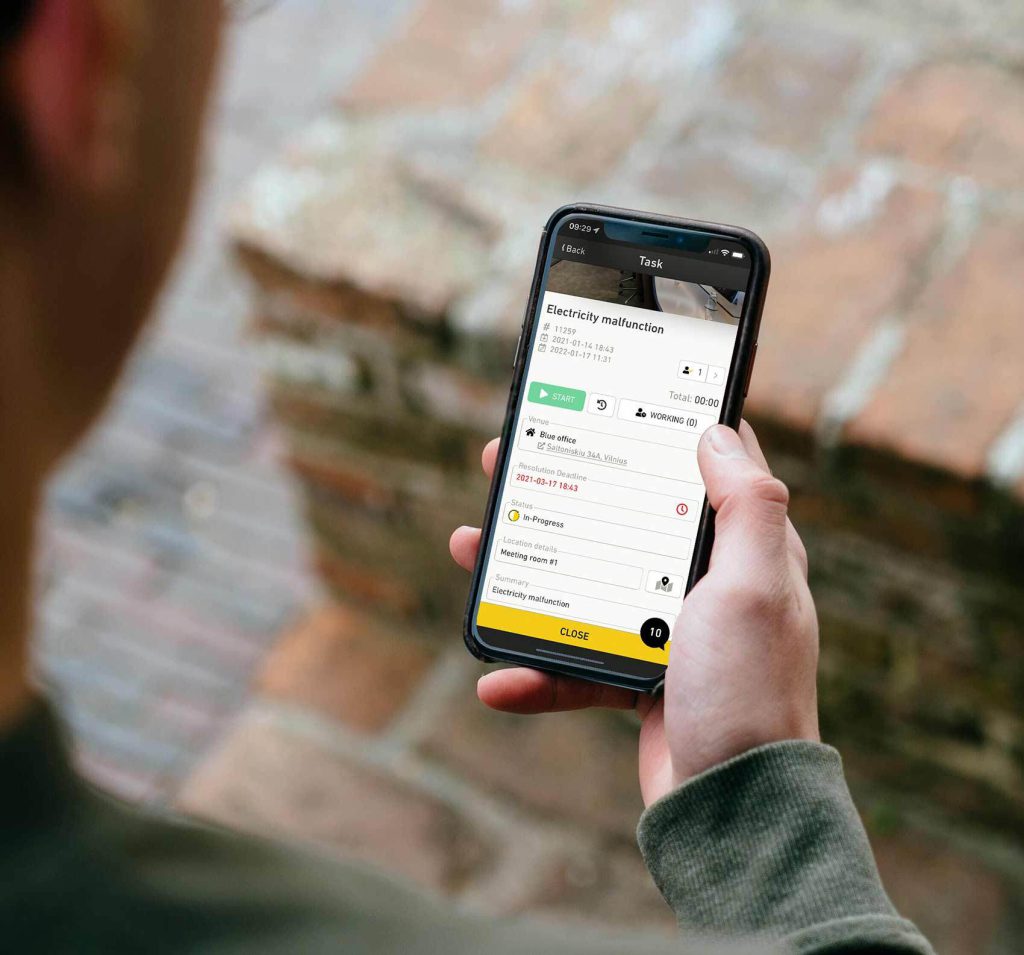
- The work order is dispatched. The technician receives the job details through a mobile app or other communication channel, along with any relevant notes, customer information, and directions.
- The technician completes the work. They travel to the site, carry out the service, record notes, capture customer signatures if required, and update the work order in real time.
- The job is closed. Once the work is complete, the service record is finalized, and any follow-up actions, invoices, or reports are generated.
What is a field service dispatcher?
A field service dispatcher is responsible for coordinating technicians, assigning work orders, and ensuring service appointments are completed efficiently. Acting as the link between customers, office staff, and field technicians, dispatchers keep daily operations running smoothly while responding quickly to unexpected changes.
On any given day, a dispatcher may:
- Review incoming work orders.
- Prioritize emergency and high-priority jobs.
- Match technicians based on skills, certifications, and availability.
- Coordinate technician schedules.
- Communicate appointment updates with customers.
- Monitor technician progress throughout the day.
- Reassign jobs when delays, cancellations, or emergencies occur.
Successful dispatchers combine strong organizational skills with excellent communication and problem-solving abilities. They must balance customer expectations with technician workloads while making quick decisions when priorities change.
Today, dispatchers are increasingly supported by field service management software. Rather than manually assigning every job, they can use intelligent scheduling tools to recommend the best technician based on location, qualifications, workload, and travel time. This allows dispatchers to focus on managing exceptions and maintaining service quality instead of spending hours updating schedules manually.
Why is field service dispatching so important?
Effective field service dispatching helps businesses deliver faster, more reliable service while making better use of their workforce. By assigning the right technician to each job and adapting quickly as schedules change, businesses can improve operational efficiency, reduce costs, and create a better customer experience.
- Faster response times – Assigning technicians quickly and efficiently helps businesses respond to service requests sooner. This is especially important for emergency callouts and businesses working under strict service level agreements (SLAs).
- Better technician utilization – Well-planned dispatching balances workloads across the team, reducing idle time while preventing technicians from becoming overbooked.
- Higher first-time fix rates – Matching technicians based on their skills, certifications, and experience improves the chances of resolving issues on the first visit, reducing repeat appointments and operating costs.
- Lower travel costs – Dispatching technicians based on their location and optimizing routes minimizes unnecessary mileage, reducing fuel costs and allowing technicians to complete more jobs each day.
- Greater customer satisfaction – Faster response times, accurate arrival windows, and technicians who arrive fully prepared all contribute to a better customer experience.
- Easier handling of emergency callouts – An organized dispatch process makes it easier to identify the best available technician and adjust schedules with minimal disruption.
- Improved communication – Modern dispatching software keeps dispatchers, technicians, and customers connected through real-time updates, reducing misunderstandings and improving coordination.
- More profitable operations – Efficient dispatching helps businesses complete more work while reducing overtime, travel expenses, and scheduling errors.
Field service dispatching vs. scheduling
Although they're closely related, field service dispatching and field service scheduling are not the same thing. Scheduling focuses on planning when work should take place, while dispatching is responsible for assigning technicians and managing jobs as they happen.
| Field service scheduling | Field service dispatching |
| Plans future appointments | Assigns technicians to specific jobs |
| Builds technician calendars | Executes work in real time |
| Focuses on appointment availability | Matches technicians based on skills, location, and workload |
| Primarily proactive | Both proactive and reactive |
| Creates the daily schedule | Adjusts schedules as conditions change |
In practice, scheduling and dispatching work hand in hand. Scheduling creates the initial plan for the day, while dispatching ensures that plan remains effective as new jobs, delays, cancellations, and emergency callouts arise.
How field service dispatching works
While every business has its own processes, most field service teams follow a similar dispatching workflow. Whether assignments are made manually or automatically, the goal is always the same: assign every job to the technician best equipped to complete it efficiently.
Receive the service request
The dispatch process begins when a customer submits a service request through a phone call, email, customer portal, online booking form, or another support channel. Once the request is received, a work order is created with all the relevant job details.
Assess the job requirements
Next, the dispatcher – or dispatching software – evaluates the work order to determine what's needed. Factors such as urgency, required skills or certifications, customer location, necessary equipment, and service level agreements all influence how the job is prioritized.
Find the best technician
Using the information gathered, the dispatcher identifies the most suitable technician based on availability, workload, qualifications, proximity to the job site, and estimated travel time. The goal is to maximize efficiency while ensuring the technician has the expertise needed to complete the work successfully.
Dispatch the work order
Once a technician has been selected, the work order is sent directly to their mobile device or field service app. This typically includes customer information, job notes, directions, required parts, and any supporting documentation needed to complete the work.
Monitor job progress
Throughout the day, dispatchers track technician locations and job statuses to ensure work is progressing as planned. Real-time visibility makes it easier to identify delays, provide support, and keep customers informed if arrival times change.
Adjust schedules as conditions change
Field service schedules are constantly evolving. Emergency callouts, traffic delays, canceled appointments, or jobs that take longer than expected often require work to be reassigned throughout the day. Modern field service management software can automate many of these adjustments, helping businesses stay productive while minimizing disruption.
Common field service dispatching challenges
Even experienced dispatchers face unexpected obstacles throughout the day. From last-minute emergencies to traffic delays, small disruptions can quickly affect technician schedules and customer expectations.
- Last-minute emergency callouts – Urgent service requests often require dispatchers to reshuffle existing schedules at short notice.
- Technician absences – Sick leave, vehicle breakdowns, or unexpected delays can leave dispatchers scrambling to redistribute work.
- Traffic and travel delays – Heavy traffic, road closures, and long distances between appointments can throw carefully planned schedules off track.
- Incomplete work order information – Missing customer details or unclear job descriptions can slow technicians down and increase the risk of repeat visits.
- Skills mismatches – Assigning work to technicians without the necessary qualifications or experience can lead to longer repair times and additional visits.
- Communication breakdowns – Poor communication between dispatchers, technicians, and customers can result in missed appointments and confusion about job status.
- Manual scheduling errors – Businesses relying on spreadsheets or paper schedules are more likely to experience double bookings, overlooked appointments, and inefficient technician assignments.
Best practices for field service dispatching
A well-defined dispatch process helps businesses respond faster, improve technician productivity, and deliver more consistent service.
Standardize work order information
Create consistent work order templates that capture customer details, service history, required parts, asset information, and special instructions before technicians head to the job.
Prioritize jobs consistently
Establish clear criteria for determining job priority, such as urgency, SLAs, customer agreements, or safety risks.
Match technicians based on skills – not just availability
The closest available technician isn't always the right choice. Consider certifications, experience, and equipment alongside availability to improve first-time fix rates.
Minimize travel time with route optimization
Grouping nearby jobs and optimizing routes reduces unnecessary mileage, lowers fuel costs, and allows technicians to complete more appointments each day.
Give technicians mobile access to job details
A mobile field service app ensures technicians can access work orders, customer information, directions, photos, and service history wherever they are.
Keep customers informed
Automatically sending appointment confirmations, ETA updates, and completion notifications improves transparency and reduces inbound support calls.
Monitor work in real time
Live dashboards and GPS tracking give dispatchers visibility into technician locations and job progress, making it easier to respond to delays.
Prepare for unexpected disruptions
Emergency callouts, cancellations, and overrunning jobs are inevitable. Building flexibility into technician schedules helps dispatchers respond without disrupting the rest of the day's work.
Review dispatch performance regularly
Track key metrics such as response times, technician utilization, travel time, and first-time fix rates to identify opportunities for improvement.
Manual vs. automated field service dispatching
Many field service businesses begin with manual dispatching, using spreadsheets, calendars, or whiteboards to assign work. While this approach may be sufficient for small teams, it becomes increasingly difficult to manage as technician numbers, service requests, and customer expectations grow.
Automated field service dispatching uses software to recommend – or automatically assign – the best technician for each job based on predefined rules and real-time data.
| Manual dispatching | Automated dispatching |
| Jobs assigned manually | Software recommends or assigns technicians automatically |
| Relies heavily on dispatcher experience | Uses real-time data and predefined rules |
| Slower to react to schedule changes | Instantly adapts to changing conditions |
| Greater risk of human error | More consistent decision-making |
| Difficult to scale | Easily supports growing teams |
Automation doesn't replace dispatchers – it gives them better tools. Rather than spending hours manually updating schedules, dispatchers can focus on handling exceptions, supporting technicians, and delivering a better customer experience.
Automating field service dispatching
As service teams grow, manually assigning jobs becomes more time-consuming and difficult to manage. Automating field service dispatching allows businesses to assign work faster, respond to changing conditions in real time, and make better use of their workforce.
Rather than relying solely on a dispatcher's knowledge and experience, field service management software uses predefined rules and live operational data to recommend – or automatically assign – the best technician for each job.
When making assignments, dispatching software can consider factors such as:
- Technician skills and certifications
- Availability and workload
- GPS location
- Travel time
- Job priority
- Service level agreements (SLAs)
- Required tools or equipment
By evaluating these factors simultaneously, automated dispatching helps businesses make faster, more consistent decisions than would be possible through manual scheduling alone.
Benefits of automating field service dispatching
Automating field service dispatching helps businesses respond faster, make better use of their workforce, and deliver a more consistent customer experience. Some of the biggest benefits include:
- Faster job assignments – Automation reduces the time spent reviewing schedules and assigning technicians manually.
- Improved technician utilization – Jobs can be distributed more evenly while minimizing idle time and unnecessary travel.
- Reduced dispatcher workload – Dispatchers can spend less time updating schedules and more time supporting technicians and customers.
- Better first-time fix rates – Assigning technicians based on skills and experience increases the likelihood that issues are resolved on the first visit.
- Greater consistency – Automated dispatching follows predefined business rules, reducing human error and ensuring work is allocated fairly.
- Improved customer experience – Faster response times, more accurate arrival windows, and better communication contribute to higher customer satisfaction.
Signs it's time to automate your dispatching
Manual dispatching can work well for small teams, but growing businesses often reach a point where spreadsheets, whiteboards, and phone calls become difficult to manage.
- You're managing a growing team of technicians – Balancing workloads and coordinating schedules becomes increasingly complex.
- Emergency callouts regularly disrupt your schedule – Automation makes it easier to reassign work without affecting the rest of the day's appointments.
- Your dispatchers spend hours updating schedules – Reducing manual administrative work frees up time for higher-value tasks.
- You're missing SLAs or response time targets – Automated assignment rules help ensure urgent jobs are prioritized appropriately.
- Travel costs continue to increase – Route optimization and location-based assignments reduce unnecessary mileage.
- You want to complete more jobs without hiring additional dispatch staff – Automation helps businesses scale more efficiently.
Features to look for in field service dispatch software
The right field service dispatch software should do more than assign technicians to jobs. It should provide the tools dispatchers need to make informed decisions, adapt quickly to changing schedules, and keep everyone connected throughout the workday.
When comparing solutions, look for features such as:
- Skills-based job assignment – Match technicians based on certifications, experience, and qualifications.
- Live technician tracking – Monitor technician locations and job progress in real time.
- Route optimization – Reduce travel time by planning the most efficient routes.
- Scheduling and calendar management – Coordinate appointments across multiple technicians and teams.
- Mobile field service app – Give technicians instant access to work orders, customer information, and job updates.
- SLA tracking – Monitor response times and help ensure contractual obligations are met.
- Reporting and analytics – Track performance metrics and identify opportunities to improve dispatch operations.
Key dispatching KPIs to track
Measuring dispatch performance helps businesses identify inefficiencies, improve technician productivity, and deliver better customer service.
| KPI | Why it matters |
| Average response time | Measures how quickly technicians are dispatched after a service request is received. |
| First-time fix rate | Indicates how often technicians resolve issues without requiring additional visits. |
| Technician utilization | Shows how much of a technician's working time is spent completing productive work. |
| Average travel time | Identifies opportunities to reduce unnecessary driving between appointments. |
| Jobs completed per technician | Measures workforce productivity and dispatch efficiency. |
| On-time arrival rate | Tracks how consistently technicians arrive within their scheduled appointment windows. |
| SLA compliance | Monitors whether response and resolution commitments are being met. |
Rather than focusing on a single metric, businesses should monitor these KPIs together to build a complete picture of dispatch performance and identify areas for continuous improvement.
Conclusion
Field service dispatching is much more than assigning technicians to jobs. It's a critical process that helps businesses respond faster, improve technician productivity, reduce travel time, and deliver a better customer experience.
As service operations grow, manual dispatching often becomes difficult to manage. Field service management software helps automate technician assignments, optimize schedules, and provide dispatchers with the real-time visibility they need to keep work moving efficiently.
If you're looking for a simple way to streamline field service dispatching, Einpix helps businesses schedule work, assign technicians, track jobs in real time, and manage every stage of the service process from one easy-to-use platform.
FAQs
What is field service dispatching?
Field service dispatching is the process of assigning technicians to service jobs based on factors such as their skills, availability, location, workload, and job priority. The goal is to ensure the right technician is assigned to the right job at the right time.
What does a field service dispatcher do?
A field service dispatcher coordinates technicians, assigns work orders, monitors job progress, communicates with customers, and adjusts schedules when unexpected changes occur.
What's the difference between scheduling and dispatching?
Scheduling plans when work should take place, while dispatching assigns technicians to jobs and manages those assignments in real time as conditions change.
Can field service dispatching be automated?
Yes. Modern field service management software can automatically recommend or assign technicians based on factors such as skills, location, availability, workload, travel time, and service priorities.
How does dispatch software choose the best technician?
Most dispatch software evaluates technician availability, skills, certifications, workload, proximity to the job site, and estimated travel time before recommending or assigning the most suitable technician.
Which industries use field service dispatching?
Field service dispatching is widely used across industries including HVAC, plumbing, electrical services, facilities management, telecommunications, utilities, property maintenance, landscaping, and appliance repair.
What are the biggest challenges in field service dispatching?
Common challenges include emergency callouts, technician absences, traffic delays, incomplete work orders, skills mismatches, communication breakdowns, and managing schedules manually.
How can I improve my field service dispatch process?
Standardizing work orders, matching technicians based on skills, optimizing travel routes, tracking dispatch KPIs, and using field service management software can all help improve dispatch efficiency and customer satisfaction.