14 Field Service Management Software Features to Support Field-Based Teams

Choosing field service management software means understanding which features will actually improve how your business operates day to day. From scheduling engineers and managing work orders to tracking jobs in real time, the right tools can save time, reduce paperwork, and improve customer service. In this guide, we'll explain the most important field service management software features to look for and how they support field-based teams.
What is field service management software?
Field service management (FSM) software helps businesses manage work carried out at customer sites. It brings together essential tools such as work order management, scheduling, dispatching, and real-time job tracking into a single platform, making it easier to coordinate office staff and field technicians.
Instead of relying on paper job sheets, spreadsheets, or multiple disconnected apps, businesses can manage the entire job lifecycle in one place – from creating and assigning work orders to tracking progress, collecting customer signatures, and analysing performance. The result is a more organised operation, faster response times, and a better experience for both technicians and customers.
👉 If you're still comparing software options, take a look at our guide to the best field service management software to see how today's leading platforms compare.
Benefits of field service management software
Field service management software does much more than help businesses organise jobs. By bringing scheduling, work orders, technician updates, and customer information together in one place, it streamlines day-to-day operations and gives managers greater visibility over their teams. This can lead to faster response times, lower operating costs, and a better experience for both employees and customers.
Some of the biggest benefits include:
- Improved productivity: Automate repetitive administrative tasks so office staff and technicians can spend more time on billable work.
- Faster scheduling and dispatching: Assign jobs based on technician availability, skills, and location to reduce delays and unnecessary travel.
- Greater visibility: Monitor jobs, technicians, and work progress in real time, making it easier to respond to changes throughout the day.
- Better customer service: Keep customers informed with accurate arrival times, faster response times, and digital records of completed work.
- Less paperwork: Replace paper job sheets and manual processes with digital work orders, signatures, documents, and reports.
- More informed decision-making: Use reporting and analytics to identify trends, measure productivity, and improve business performance.
- Scalability: Standardize processes and manage a growing workforce more efficiently as your business expands.
The most important field service management software features
Not every field service business needs the same set of tools. A small team may only need the basics to manage jobs and schedules, while larger organisations often rely on advanced features to coordinate technicians, track assets, and analyse performance.
The following field service management software features form the foundation of most modern FSM platforms. Understanding what each one does will help you compare solutions and choose software that meets your business's current and future needs.
Work order management
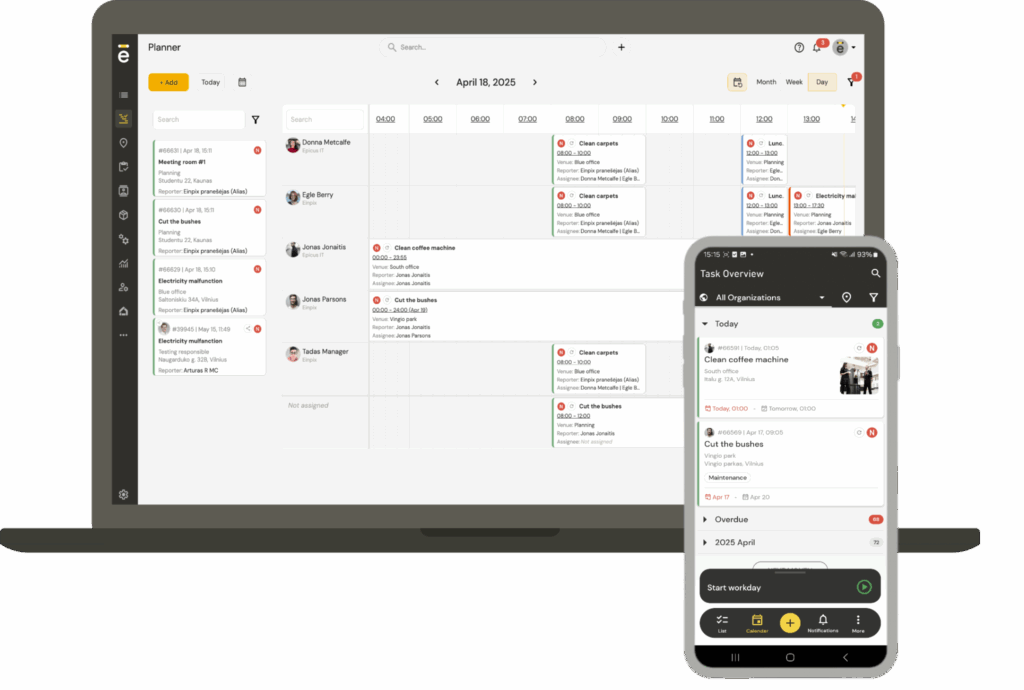
Work order management and dispatching is at the heart of field service management software. It provides a central place to create, assign, track, and complete service requests, ensuring every job follows a consistent process from start to finish.
When a customer requests a repair, installation, or routine maintenance visit, a work order captures everything the technician needs to complete the job. This might include the customer's details, job description, asset information, photos, documents, scheduled appointment time, and any special instructions. As work progresses, technicians can update the work order in real time, allowing office staff to monitor progress without relying on phone calls or paperwork.
By keeping all job information in one place, work order management helps reduce administrative errors, improve communication between the office and the field, and ensure every job is completed efficiently and accurately.
Field agent scheduling
Scheduling features help businesses assign the right technician to the right job at the right time. Rather than managing appointments manually, office staff can view engineer availability, workloads, skill sets, and upcoming jobs from a central scheduling calendar.
As new work comes in, jobs can be assigned based on location, qualifications, or availability to avoid scheduling conflicts and reduce unnecessary travel. If plans change during the day, appointments can be quickly rescheduled and technicians notified immediately through the mobile app.
Efficient field agent scheduling helps businesses maximise technician productivity, reduce missed appointments, and provide customers with more accurate appointment times.
Field agent dispatching
While scheduling focuses on planning upcoming work, dispatching is all about responding to what's happening right now. Dispatchers can assign new jobs, reallocate existing work, or send the nearest available technician to urgent call-outs as priorities change throughout the day.
Real-time visibility into technician locations, workloads, and job status makes it easier to make informed decisions without relying on phone calls or guesswork. Updated job information is sent directly to technicians, helping them reach customers faster and reducing delays caused by manual communication.
Effective dispatching improves response times, keeps engineers productive, and ensures resources are used as efficiently as possible.
Digital signature collection
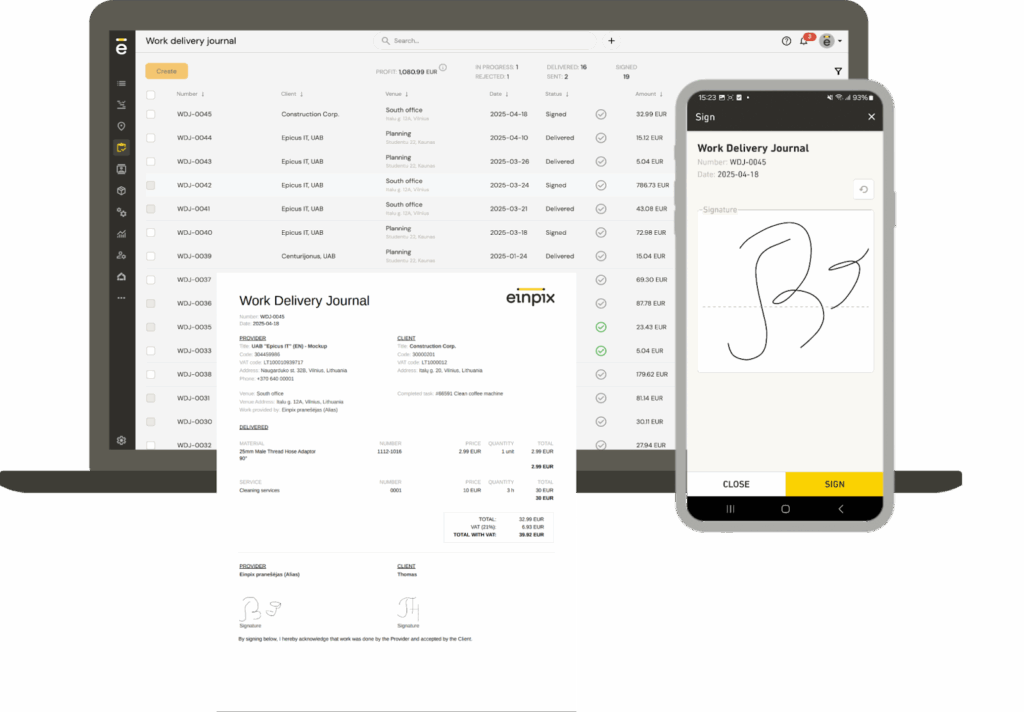
Digital signature collection allows technicians to capture customer approval electronically once work has been completed. Instead of relying on paper forms, signatures can be collected directly within the field service management app and stored alongside the completed work order.
This creates a clear record of completed work, approved quotations, or delivered equipment that can be accessed whenever needed. Digital records also simplify administration by reducing paperwork and making it easier to retrieve documentation if questions or disputes arise later.
For businesses managing high volumes of service visits, digital signatures provide a faster, more reliable way to confirm work has been completed.
Real-time agent and jobs tracking
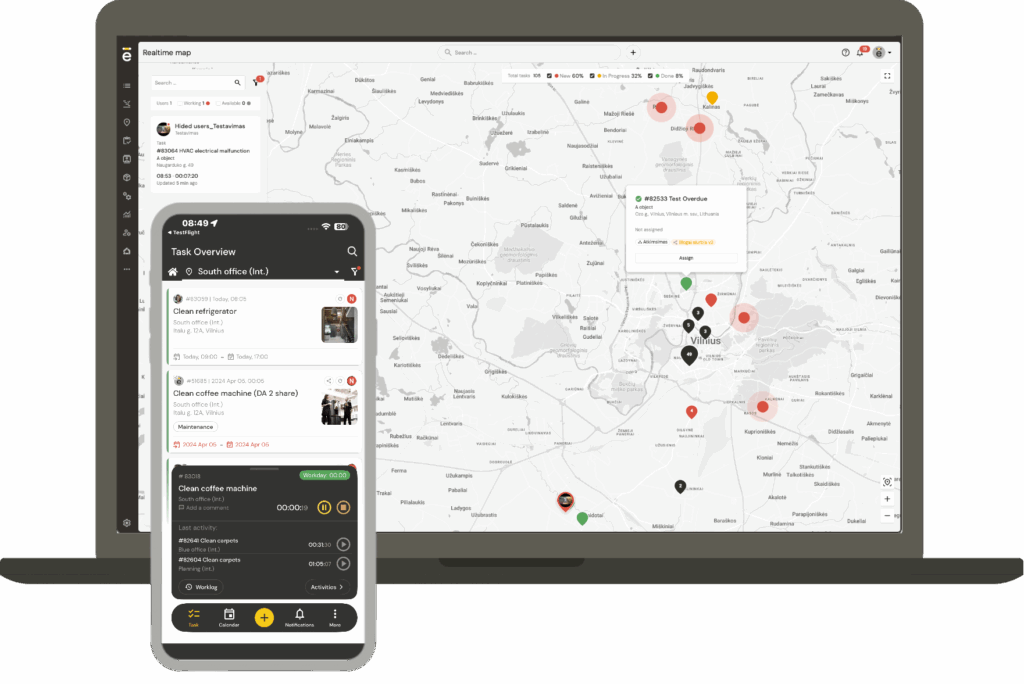
Real-time agent and jobs tracking gives office staff complete visibility over what's happening in the field throughout the day. Managers can monitor technician locations, job progress, and working hours as updates are submitted, without needing to contact engineers directly.
With Einpix, this visibility is enhanced through a live map view that shows technician locations, active jobs, and upcoming tasks in one place. Each job includes a clear threshold indicator that highlights when a task is at risk of becoming late, allowing managers to take action before delays occur. When schedules change, the system allows you to identify the closest available technician and factors in real-time traffic conditions to ensure the fastest possible response. Tasks can also be assigned directly from the map, making dispatching quicker and more intuitive.
This live view makes it easier to identify delays, respond to changing priorities, and provide customers with accurate updates if appointment times change. It also helps businesses understand how time is being spent, making it easier to improve scheduling and resource allocation over time.
Greater visibility leads to better decision-making, improved accountability, and more efficient day-to-day operations.
Route planning
Route planning helps technicians travel between jobs as efficiently as possible. By organising appointments into logical routes, businesses can reduce unnecessary mileage, minimise travel time, and complete more jobs during the working day.
Many field service management platforms also consider factors such as appointment times and traffic conditions when planning routes, helping technicians arrive on time while avoiding unnecessary delays.
More efficient routing not only reduces fuel costs but also improves productivity and creates a better experience for customers waiting for an engineer to arrive.
Planned preventive maintenance
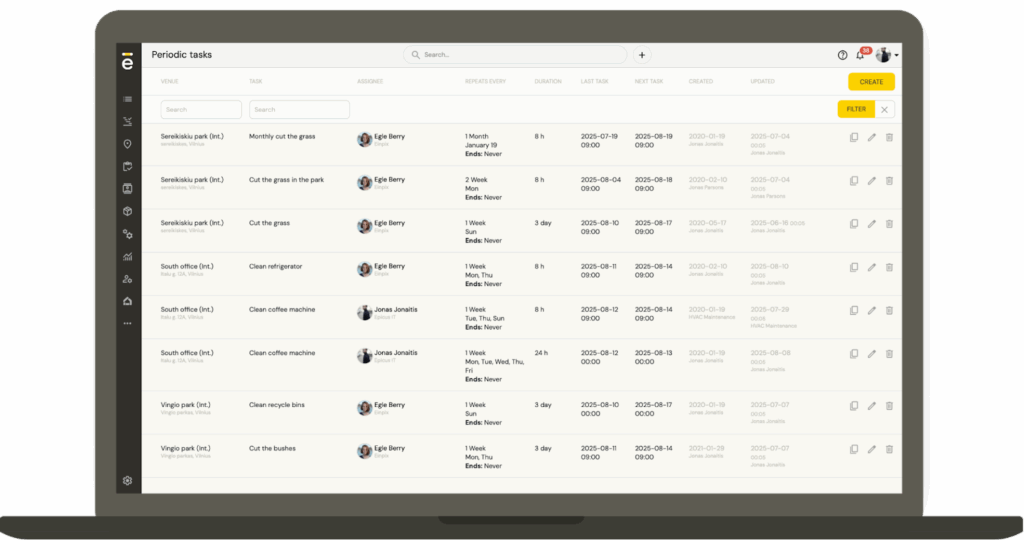
Preventive maintenance features allow businesses to schedule recurring inspections and servicing before equipment failures occur. Instead of reacting to breakdowns, maintenance tasks can be planned at fixed intervals based on time, usage, or service agreements.
Recurring work orders can be generated automatically, ensuring no scheduled maintenance visits are overlooked. Technicians also have access to previous service history, making it easier to identify recurring issues and complete maintenance efficiently.
A proactive maintenance programme helps extend asset lifespan, reduce unexpected downtime, and improve customer satisfaction through more reliable service.
Secure document sharing
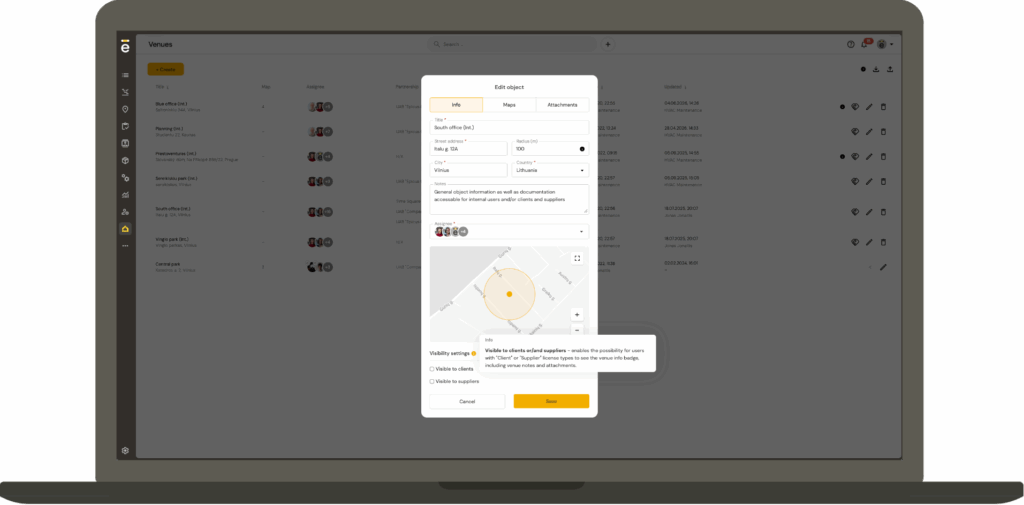
Field service teams often need access to manuals, certificates, contracts, photos, and other important documents while they're on site. Secure document sharing keeps this information organised in one place, ensuring everyone involved has access to the latest version when they need it.
Documents can be linked directly to work orders, customer records, or assets, making it easy for technicians to find relevant information without searching through emails or paper files. Office staff can also upload new documents as projects progress, ensuring field teams always have the latest information.
Centralised document management improves collaboration, reduces paperwork, and helps businesses maintain accurate records.
Offline mode
Field technicians don't always have reliable internet access, particularly when working in remote locations or inside large industrial buildings. Offline mode allows them to continue accessing job information and recording updates even without a network connection.
Technicians can view work orders, complete forms, capture photos, collect signatures, and record notes as normal. Once an internet connection becomes available again, the data is automatically synchronised with the central system.
This ensures work can continue uninterrupted regardless of connectivity, helping businesses avoid delays and reducing the risk of lost information.
Mobile app
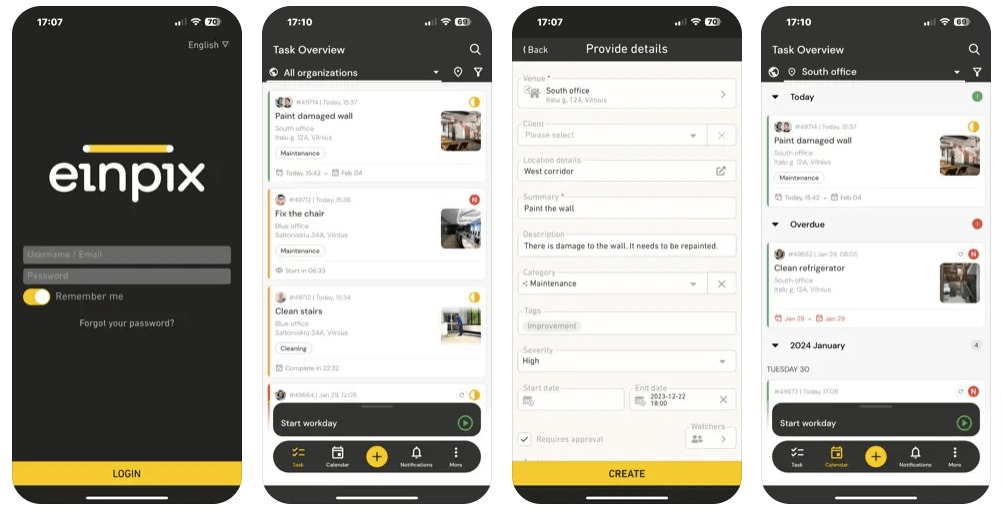
A mobile app gives field technicians everything they need to manage jobs while away from the office. Instead of carrying paperwork or contacting the office for updates, engineers can access work orders, customer information, schedules, documents, and asset histories directly from their smartphone or tablet.
As jobs progress, technicians can update statuses, upload photos, collect customer signatures, and communicate with office staff in real time. This keeps everyone working from the same information and reduces delays caused by manual administration.
Mobile access improves productivity, increases data accuracy, and helps businesses deliver a faster, more professional service.
Asset tracking and management
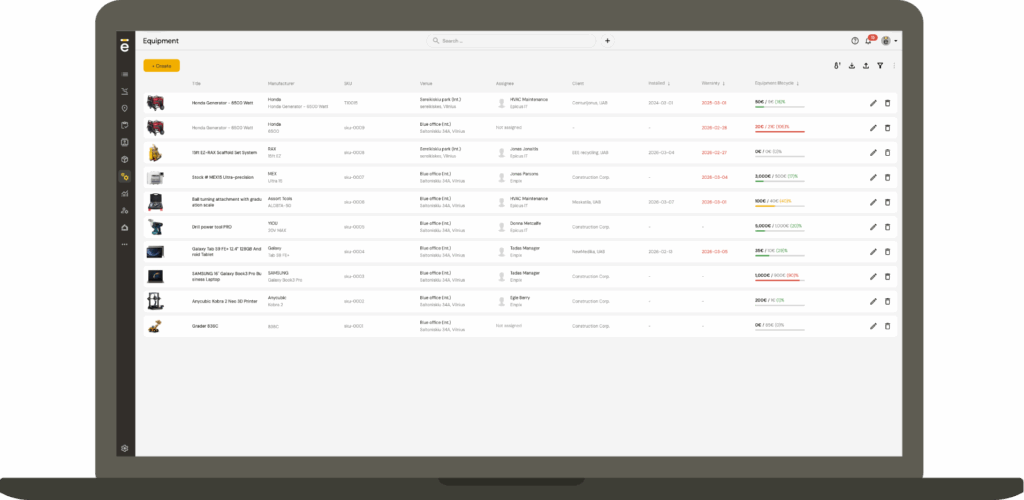
Asset tracking and management helps businesses maintain accurate records for the equipment they install, inspect, or service. Each asset can have its own service history, maintenance schedule, warranty information, manuals, and supporting documentation stored in one place.
Having instant access to this information allows technicians to arrive on site with a better understanding of previous work, making it easier to diagnose faults and recommend appropriate maintenance. Office staff can also monitor asset performance and ensure scheduled servicing isn't missed.
Keeping accurate asset records supports preventive maintenance, reduces equipment downtime, and helps businesses provide a more informed service.
Reporting and analytics
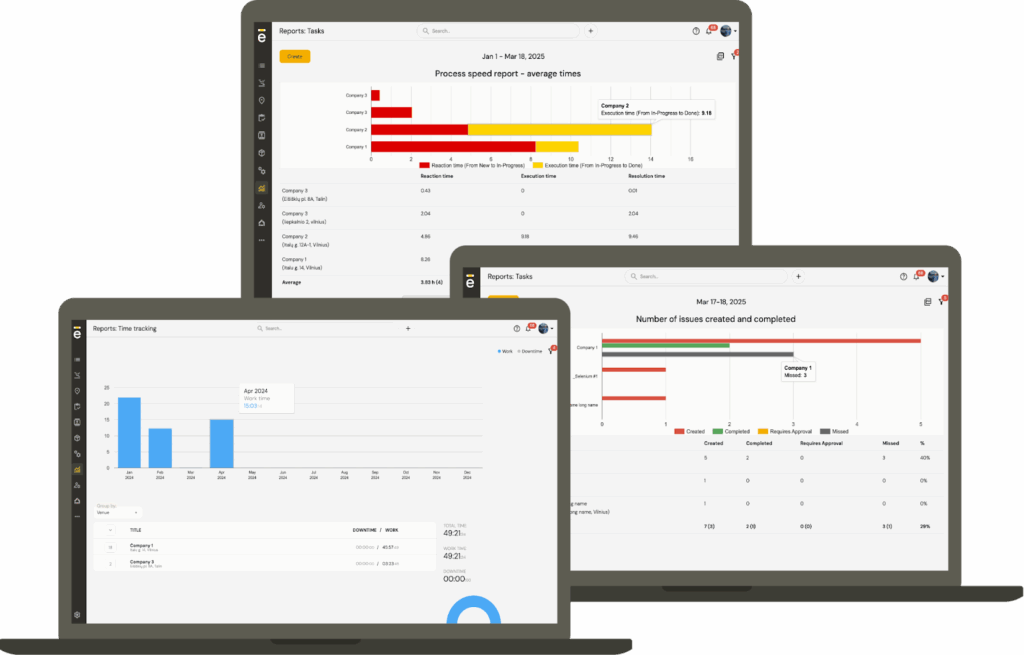
Reporting and analytics transform day-to-day operational data into valuable business insights. Managers can monitor technician productivity, job completion times, response times, and other key performance indicators to understand how the business is performing.
By identifying trends and recurring issues, businesses can make informed decisions about staffing, scheduling, training, and resource allocation. Comparing estimated and actual job durations can also highlight opportunities to improve efficiency and profitability.
Regular reporting helps businesses measure performance, identify areas for improvement, and make data-driven decisions as they grow.
Collaboration & communication
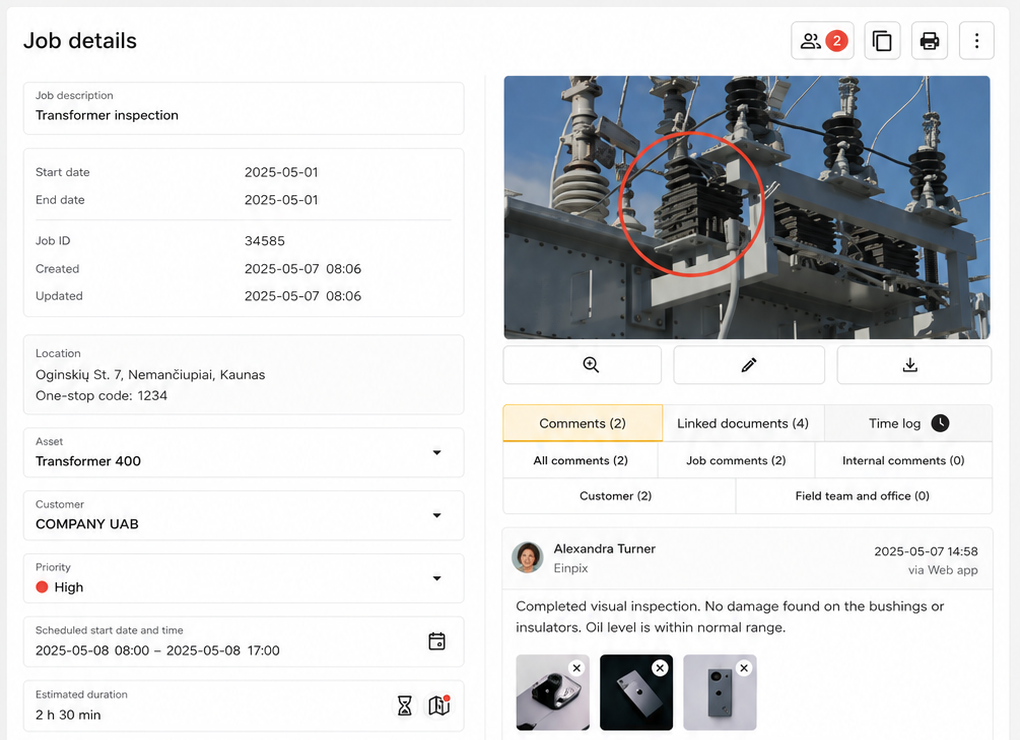
Successful field service operations depend on effective communication between office staff, technicians, customers, and contractors. Built-in collaboration tools keep conversations, documents, and job updates linked directly to the relevant work order, reducing the need to switch between emails, phone calls, and messaging apps.
Technicians can ask questions, share photos, and receive updated instructions while working on site, ensuring everyone is working from the latest information. This reduces misunderstandings, speeds up decision-making, and helps jobs progress more smoothly.
Keeping communication centralised improves teamwork, increases accountability, and creates a clear record of every stage of the job.
Accessible API
An accessible API allows businesses to connect their field service management software with other systems they already use. This could include accounting software, CRM platforms, reporting tools, inventory systems, or other business applications.
By sharing data automatically between systems, businesses can reduce duplicate data entry, streamline workflows, and build processes that better suit the way they work. APIs also provide greater flexibility for organisations with custom software requirements or more complex operational needs.
For growing businesses, API access makes it easier to integrate field service management software into an existing technology stack while supporting future expansion.
Field service management system requirements by industry
While the core features of field service management software are similar across most platforms, the capabilities that matter most depend on the type of work your business carries out. A company servicing heavy machinery, for example, has very different operational requirements to an HVAC contractor or a general maintenance business. Below are some of the features that different industries typically prioritize when choosing field service management software.
Heavy machinery
Businesses that service construction, agricultural, or industrial equipment often manage high-value assets that require regular inspections and preventative maintenance. Detailed service records are essential, as technicians may need to review previous repairs, warranty information, and maintenance history before arriving on site.
For these businesses, features such as asset tracking and management, planned preventive maintenance, secure document sharing, and offline mode are particularly valuable. Real-time technician tracking and route planning also help dispatch urgent breakdowns quickly, reducing costly equipment downtime.
HVAC
HVAC businesses typically juggle a mix of emergency call-outs, scheduled maintenance visits, and new installations. Efficient scheduling and dispatching are therefore essential, particularly during busy periods when workloads can change throughout the day.
Key features include work order management, field agent scheduling, field agent dispatching, route planning, mobile app access, and digital signature collection. Reporting and analytics can also help managers monitor response times, technician productivity, and recurring maintenance contracts.
🤓 Further reading: Check out our roundup of essential HVAC tools (with pictures).
General installation and maintenance businesses
Businesses providing electrical, plumbing, facilities management, security systems, cleaning, landscaping, and other installation or maintenance services need software that can support a wide variety of job types without adding unnecessary complexity.
A combination of work order management, real-time agent and jobs tracking, collaboration and communication, secure document sharing, and reporting and analytics helps teams stay organized while giving managers complete visibility over daily operations. As businesses grow, features such as an accessible API also make it easier to integrate field service management software with other business systems.
Einpix: All the key field service management features in one platform
The best field service management software doesn't just offer a long list of features – it brings everything together in a way that's easy for office staff and field technicians to use every day. From creating work orders and scheduling engineers to tracking jobs in real time and managing recurring maintenance, the right platform should help your business work more efficiently without adding unnecessary complexity.
Einpix brings together the core field service management features covered in this guide in one platform. Teams can plan and dispatch work, monitor job progress, manage equipment and recurring maintenance, record working time, complete checklists, collect digital signatures and generate reports. Einpix also supports customer and subcontractor workflows, a client portal, and collaboration between separate partner organisations – helping service and maintenance businesses manage more than day-to-day scheduling.
👉 Create your free Einpix account today and see how much time the right field service management software can save your business.
FAQs
What are the most important features of field service management software?
The most important field service management software features include work order management, scheduling, dispatching, real-time technician tracking, route planning, mobile access, asset management, reporting, and digital signature collection. Together, these tools help businesses organize work, improve productivity, and deliver a better customer experience.
Which field service management system is easiest to use for non-technical staff?
The easiest field service management software is one that simplifies everyday tasks rather than adding unnecessary complexity. Look for an intuitive interface, a straightforward mobile app, drag-and-drop scheduling, and clear work order workflows that require minimal training. Einpix is designed with ease of use in mind, helping both office staff and field technicians get up and running quickly while still providing the tools needed to manage jobs efficiently.
Why is work order management important?
Work order management provides a central place to create, assign, track, and complete service jobs. It ensures technicians have all the information they need before arriving on site while giving office staff full visibility over job progress from start to finish.
How does scheduling software improve field service operations?
Scheduling software helps businesses assign jobs based on technician availability, skills, location, and workload. This reduces scheduling conflicts, minimises travel time, and makes it easier to respond quickly to customer requests.
What is the difference between scheduling and dispatching?
Scheduling is the process of planning future appointments and assigning work to technicians. Dispatching happens in real time, allowing businesses to send engineers to new or urgent jobs as priorities change throughout the day.
Why do field technicians need a mobile app?
A mobile app gives technicians access to work orders, customer information, schedules, documents, and asset histories while they're on site. It also allows them to update job statuses, upload photos, collect digital signatures, and communicate with the office without returning to base.
How does real-time agent and jobs tracking benefit service businesses?
Real-time tracking gives managers visibility into technician locations, job progress, and working hours throughout the day. This makes it easier to respond to delays, optimize schedules, provide accurate customer updates, and improve overall operational efficiency.
What is offline mode in field service management software?
Offline mode allows technicians to continue viewing work orders and recording updates even when they don't have an internet connection. Once connectivity is restored, all changes are automatically synchronized with the central system.
How does route planning reduce operating costs?
Route planning calculates the most efficient routes between appointments, helping technicians spend less time travelling and more time completing jobs. This reduces fuel costs, improves productivity, and enables businesses to serve more customers each day.
Can field service management software help with asset maintenance?
Yes. Asset management features allow businesses to store equipment records, maintenance histories, warranty information, and service schedules in one place. This supports preventative maintenance programmes and helps technicians make better-informed decisions when servicing equipment. For a practical example, see how Einpix supports equipment maintenance workflows.
Can small businesses benefit from field service management software?
Yes. Field service management software can help businesses of any size reduce paperwork, organize schedules, and improve communication between office staff and technicians. Einpix offers a free trial, while paid subscriptions start with a minimum package of five user seats. Small teams can use the platform too, and businesses can expand their processes as they grow.
Is digital signature collection necessary for field service businesses?
Digital signature collection provides electronic proof that work has been completed or approved by the customer. It reduces paperwork, improves record keeping, and creates a clear audit trail that can help resolve disputes if they arise.