What is Computer Aided Facility Management? CAFM Meaning, Benefits & More

Computer-Aided Facility Management (CAFM) is the use of software to organise and manage building information, maintenance activities, assets, space and facility operations in one system. CAFM helps facility managers coordinate day-to-day work, keep information accessible and maintain visibility across buildings and equipment.
In practice, CAFM software supports maintenance scheduling, asset records, work order coordination and workplace information. Depending on the system, it may also include space planning, compliance documentation and contractor management.
If you’ve come across terms like CAFM, CMMS, or IWMS and wondered how they differ, the distinction usually comes down to scope: CAFM focuses on building operations and facility workflows, while related systems may specialise in maintenance or broader workplace management.
In short: A computer-aided facility management (CAFM) system helps teams organise building information, work orders, preventive maintenance, assets and facility operations in one digital environment. Its scope varies: some CAFM tools emphasise space and property administration, while others focus more on maintenance delivery and contractor coordination.
CAFM meaning: What does CAFM stand for?
CAFM stands for “computer aided facility management”. The term refers to software that supports day-to-day facility operations by digitising administrative and operational tasks that were traditionally handled manually.
Typical CAFM platforms help manage:
- Work orders
- Planned preventive maintenance
- Asset registers
- Space allocation
- Building documentation
- Health and safety records
- Vendor and contractor management
- Compliance schedules
The goal is simple: reduce manual work, improve response times, and make facility data easier to access. In practice, CAFM acts as a shared operational system for facility managers, maintenance teams, and office administrators.
What is CAFM software used for?
The practical use of computer aided facility management software depends on the type of organisation, but most teams rely on it to organise recurring facility tasks, centralise operational records, and make building performance easier to manage over time.
Rather than handling maintenance, compliance, and space data across separate systems, CAFM brings those processes into one environment so teams can track what is happening across a site in real time.
Common use cases include:
Maintenance planning
CAFM systems are widely used to structure both reactive and planned maintenance. Instead of relying on spreadsheets, calendars, or email reminders, facility teams can automate recurring service schedules and link them directly to individual assets or locations.
This makes it easier to ensure critical maintenance happens on time, especially where missed servicing could lead to safety risks, downtime, or costly repairs. Many systems also allow maintenance histories to be attached to each asset, so teams can see recurring faults and identify equipment that is becoming unreliable. Modern CAFM platforms often support technician assignment, priority levels, and SLA tracking, which helps maintenance teams manage workload more consistently.
Examples include:
- HVAC servicing
- Fire safety inspections
- Electrical testing
- Lift maintenance
Asset tracking
CAFM software is often used as a live asset register, giving facility managers a single source of truth for building equipment and infrastructure.
Instead of keeping separate records for warranties, serial numbers, service dates, and replacement cycles, all asset information is stored against each item in the system. This makes long-term planning much easier because managers can quickly see which assets are approaching end of life, which require frequent repair, and where capital spending may soon be needed.
Because service records remain attached to each asset, CAFM also supports more informed preventive maintenance decisions and helps reduce unexpected equipment failures.
Examples include:
- Installation dates
- Warranty information
- Service history
- Asset location
Space management
For offices, schools, hospitals, and public buildings, CAFM is often used to understand how physical space is actually being used.
This becomes especially valuable where organisations need to balance occupancy, room availability, and future layout decisions. Floor plans, room data, and occupancy records can all be linked inside the system, allowing managers to identify underused areas or capacity pressure.
In hybrid workplaces, this has become more important because office layouts often need to adapt to changing attendance patterns rather than fixed desk allocation. CAFM data helps support relocation planning, meeting room allocation, and future estate decisions by showing actual usage rather than assumptions.
Examples include:
- Room usage
- Occupancy levels
- Desk assignments
- Floor plans
Compliance management
Compliance is one of the strongest reasons organisations invest in CAFM because building-related obligations often involve fixed deadlines and detailed documentation.
A CAFM system helps teams store certificates, inspection records, service logs, and audit histories in one place, while also generating reminders before key compliance dates are missed.
This is particularly important in regulated environments where evidence must be available quickly during audits or inspections. Instead of searching through paper records or multiple folders, managers can immediately access service history linked to the relevant asset, contractor, or building area.
Many organisations use CAFM to maintain digital records for:
- Safety inspections
- Risk assessments
- Certification deadlines
- Audit logs
Work order control
CAFM also improves how maintenance requests move through a business.
Instead of handling issues through phone calls, inboxes, or informal reporting, requests can be logged directly into a central system where they are categorised, prioritised, assigned, and tracked through to completion.
This gives managers immediate visibility over outstanding work, response times, and technician workload. It also creates a reliable service history, which becomes valuable when recurring issues need investigation.
Mobile-enabled CAFM systems extend this further by allowing technicians to update work orders on site, attach photos, and record parts used without returning to the office.
What are the different types of CAFM system?
There are several ways organisations can deploy computer aided facility management software, and the right option usually depends on internal IT policies, budget, security requirements, and how many users need access across different locations.
While most CAFM platforms offer similar core functions – such as maintenance scheduling, asset tracking, and compliance management – the way the software is delivered can significantly affect setup costs, flexibility, and long-term administration.
For many organisations, the decision comes down to whether they want a cloud-based system that is managed externally or an on-premises platform that is hosted internally.
Cloud-based CAFM software
Cloud-based CAFM software runs on remote servers and is accessed through a web browser or mobile app, which means users do not need to install the system on local machines or maintain internal infrastructure.
This model has become increasingly common because it reduces technical overhead and makes rollout much faster, especially for organisations operating across multiple sites. Updates are usually handled automatically by the software provider, so new features, security patches, and system improvements happen without internal IT intervention.
Because the system is available through the internet, facility managers, maintenance teams, and contractors can access live data from different locations. That is especially useful when maintenance teams need to update work orders, review asset records, or complete inspections while working on site.
Benefits typically include:
- Lower upfront implementation costs
- Automatic software updates
- Easier remote access
- Faster deployment across multiple locations
- Reduced internal IT maintenance
On-premises CAFM software
On-premises CAFM software is installed on an organisation’s own servers and managed internally.
This approach gives businesses full control over where data is stored, how security is configured, and when updates are applied. It is often chosen by larger organisations, public sector bodies, or businesses operating under strict data governance requirements.
Because the software sits within the company’s own infrastructure, internal IT teams usually take responsibility for maintenance, backups, upgrades, and system performance.
While on-premises systems can offer greater control, they usually require more technical support and higher upfront investment compared with cloud-based alternatives.
Common advantages include:
- Full control over infrastructure
- Internal data hosting
- Custom security configuration
- Greater control over update timing
Hybrid CAFM systems
Some organisations use a hybrid model that combines elements of both cloud and on-premises deployment. For example, core operational data may remain on internal servers while mobile access or reporting tools are delivered through cloud services. This approach can help organisations modernise gradually without fully replacing legacy systems, particularly when older building management software is already in place.
Hybrid setups are usually more common in larger organisations with complex infrastructure, where flexibility is needed but full migration is not practical immediately.
How CAFM software works in daily operations
A CAFM platform usually combines core facility functions – including work order management, preventive maintenance scheduling, asset records, compliance tracking, and space management – into one interface so teams can manage daily operations from a single system.
A typical workflow looks like this:
- A maintenance issue is reported
- A work order is created automatically
- The task is assigned to a technician
- Asset history is linked to the job
- Completion notes are stored for future reference
For example, if a facility manager logs a fault with an HVAC unit after staff report inconsistent temperature in part of the building, the CAFM system can automatically generate a work order, assign it to an HVAC engineer, link the unit’s service history, and record the repair once completed. If the same asset has repeated faults, that history helps the team decide whether further maintenance or replacement is needed.
This creates a full maintenance record without separate spreadsheets or paper files.
Many modern systems also include mobile access, allowing technicians to:
- Update job status on site
- Upload photos
- Scan asset QR codes
- Record parts used
Benefits of computer aided facility management
The biggest advantage of computer aided facility management is that it turns day-to-day facility activity into structured, usable operational data. Instead of relying on disconnected records, teams can work from one system that supports maintenance, compliance, and planning at the same time.
Centralises facility data
One of the most immediate benefits of CAFM is that it brings facility information into one place.
Without a central system, maintenance requests, inspection records, asset details, and service schedules often sit across spreadsheets, emails, paper records, or separate software tools. That makes it harder to see what has been completed, what is overdue, and where issues are repeating.
A CAFM platform creates a single operational record for each asset, location, or task, so facility managers can quickly access service history, contractor details, and maintenance status without searching through multiple sources.
This also makes it easier to identify recurring faults and plan work more consistently across multiple buildings.
Makes reporting and compliance easier
CAFM systems make reporting far more straightforward because operational records are already structured inside the system.
When inspections, work orders, and service activity are logged digitally, managers can quickly produce reports for internal reviews, audits, insurance requirements, or regulatory checks.
That is especially useful when demonstrating that scheduled inspections have been completed on time or showing maintenance history for a specific asset.
Instead of manually compiling records, teams can usually access maintenance logs, completion dates, compliance records, and outstanding tasks in a few clicks.
Improves visibility across buildings and assets
CAFM gives facility teams a clearer view of how buildings and equipment are performing over time.
Because maintenance activity, space records, and asset information are linked, managers can see where faults occur most often, which assets require the most attention, and how space is being used across a site.
In many systems, floor plans and asset locations can also be linked visually, making it easier to understand where equipment is installed and how building areas are organised. That visibility supports faster decisions, especially when planning repairs, allocating resources, or assessing whether equipment should be repaired or replaced.
Supports more consistent maintenance planning
By automating schedules and storing service history, CAFM helps teams move away from purely reactive maintenance. Recurring inspections, planned servicing, and statutory checks can be scheduled in advance, with reminders generated automatically when tasks are due. This reduces the risk of missed maintenance and helps ensure critical systems such as HVAC, fire safety equipment, and electrical assets are serviced on time.
Over time, that consistency can help extend asset life and reduce avoidable downtime.
CAFM vs CMMS: What’s the difference?
Because CAFM often overlaps with maintenance software, many organisations compare it with CMMS before choosing a system.
Although the two systems share some core functionality, they are designed with different priorities. CAFM supports wider building and workplace operations, while CMMS is built specifically around maintenance planning and asset reliability.
| Category | CAFM | CMMS |
| Main focus | Facility operations | Maintenance management |
| Space planning | Yes | Usually limited |
| Asset tracking | Yes | Yes |
| Work orders | Yes | Yes |
| Building documentation | Yes | Limited |
| Maintenance scheduling | Yes | Strong core feature |
| Compliance support | Broad facility scope | Maintenance-focused |
A CMMS (computerised maintenance management system) is built specifically for maintenance operations, so it often includes deeper tools for technician workload planning, spare parts control, failure analysis, and maintenance reporting than a standard CAFM platform.
For example, many CMMS platforms support:
- Spare parts inventory management
- Technician labour tracking
- Downtime reporting
- Failure-code analysis
- Maintenance cost tracking by asset
A CAFM platform covers maintenance too, but spreads functionality across wider facility responsibilities such as space management, compliance tracking, workplace administration, and building records.
That means CAFM is often the better fit when maintenance is only one part of a broader facility management role, while CMMS is often preferred when maintenance performance itself is the main operational priority.
In simple terms:
- CAFM helps manage the building as a whole
- CMMS helps manage maintenance inside that building in greater depth
For organisations managing offices, schools, healthcare buildings, or mixed-use facilities, CAFM often provides enough maintenance capability alongside wider operational control. In more asset-intensive environments such as manufacturing or industrial operations, CMMS usually offers greater maintenance depth.
CAFM vs CMMS vs IWMS vs FSM: Which approach fits?
These categories overlap but answer different operational questions. CAFM brings facility, building and workplace information together. CMMS concentrates on maintenance work orders, equipment reliability and service histories. IWMS typically extends into property portfolios, space, leases and workplace strategy. FSM concentrates on scheduling, dispatching and documenting work delivered by mobile service teams.
For example, a property owner seeking portfolio-wide space and lease management may need broader IWMS capabilities, while a maintenance contractor coordinating technicians, inspections, service-level agreements and customer approvals may place greater value on FSM workflows. Selecting software should start with the actual processes to be managed, not the category label alone.
Practical CAFM-style maintenance workflow with Einpix
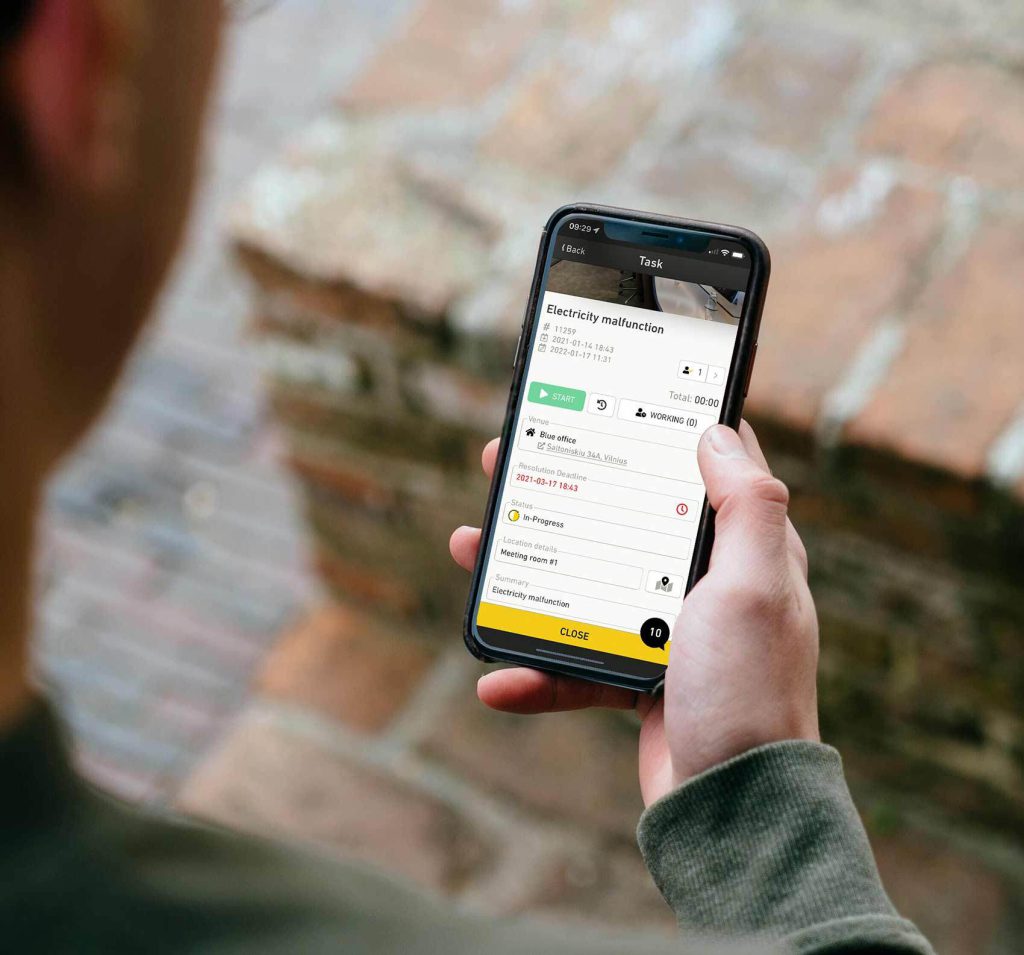
A building maintenance team can use Einpix to register an equipment-related issue, assign the work to a responsible technician or contractor, track its deadline and status, complete a mobile checklist, attach photographs, record work time and document completion. Planned and recurring maintenance tasks can be organised alongside reactive requests, while asset and equipment records provide context for future work.
This is an example of operational facility maintenance management, rather than a claim that every enterprise CAFM or IWMS feature is included. Teams should evaluate their required space, real-estate, financial and integration capabilities separately.
How to measure the benefits of CAFM and maintenance software
Instead of assuming a fixed percentage improvement, establish a baseline and track measures such as on-time preventive maintenance completion, response and resolution times, overdue work orders, repeat faults, technician hours and the share of work orders completed with the required documentation. Results depend on workflow design, data quality and adoption.
For definitions and ways to calculate these operational measures, see our facility management KPIs guide. For the broader discipline, read what facility management means; for software selection, see our CAFM software overview.
Is CAFM still relevant today?
Yes – but modern facility software has evolved.
Traditional CAFM systems focused heavily on desktop-based building records. Newer platforms increasingly combine CAFM functions with mobile workflows, automation, and service management features.
That means many organisations now choose systems that deliver CAFM-style control without the complexity of older enterprise software.
Why many teams now choose flexible systems instead of traditional CAFM
Some CAFM platforms are powerful but difficult to configure and expensive to maintain.
For teams that mainly need…
- Work order control
- Asset tracking
- Maintenance scheduling
- Technician coordination
- Reporting
…a lighter operational platform can often deliver faster results.
Einpix is a field service management platform that helps teams manage maintenance workflows without the overhead often associated with traditional CAFM systems.
With Einpix, teams can:
- Schedule preventive maintenance
- Track jobs in real time
- Assign technicians instantly
- Store service history
- Manage assets
- Use mobile checklists
- Access free core features
That makes it especially practical for growing maintenance teams that want CAFM-style visibility without enterprise-level complexity.
👉 Try Einpix free to see how digital work orders, asset tracking, and preventive maintenance can simplify day-to-day facility operations.
Frequently asked questions about CAFM
What is computer aided facility management in simple terms?
CAFM is software that helps organisations manage building operations, maintenance tasks, assets, and facility records digitally.
Is CAFM the same as CMMS?
No. CMMS focuses mainly on maintenance, while CAFM includes broader facility operations such as space management and compliance tracking.
Who needs CAFM software?
Any organisation managing buildings, equipment, or maintenance workflows across one or more locations can benefit from CAFM.
Can small businesses use CAFM?
Yes, although many smaller teams choose lighter maintenance systems if they do not need full enterprise facility management.
What does CAFM stand for?
CAFM stands for computer-aided facility management (also written computer aided facilities management). It refers to software used to organise building, asset, maintenance and workplace information.
What is the difference between CAFM and IWMS?
CAFM usually emphasises facility operations, records and maintenance-related workflows. IWMS commonly covers a wider real-estate and workplace portfolio, potentially including leases, strategic space planning and capital projects. Exact capabilities depend on the product.
Can field service management software support CAFM-style tasks?
Yes. FSM software can support building maintenance processes such as work orders, recurring inspections, technician scheduling, checklists and service documentation. It does not automatically replace every space-planning or enterprise real-estate function of a full CAFM or IWMS platform.